

Remember? In the past, when choosing an AI model, it always felt like a dilemma: choose a top-tier model that is “brainy but slow to react and expensive”, or a lightweight player that is “quick, easy on the pocket, but occasionally makes small mistakes”? It’s like being forced to compromise between speed and intelligence.
Google’s latest masterpiece, Gemini 3 Flash, completely rewrites this rule. Not only is it fast, but it’s also surprisingly smart, and unexpectedly affordable. This model is born for workflows requiring “high-frequency interaction,” with a clear goal: to prove that powerful intelligence can coexist with lightning speed.
Data Speaks: Dual Upgrade in Speed and Intelligence
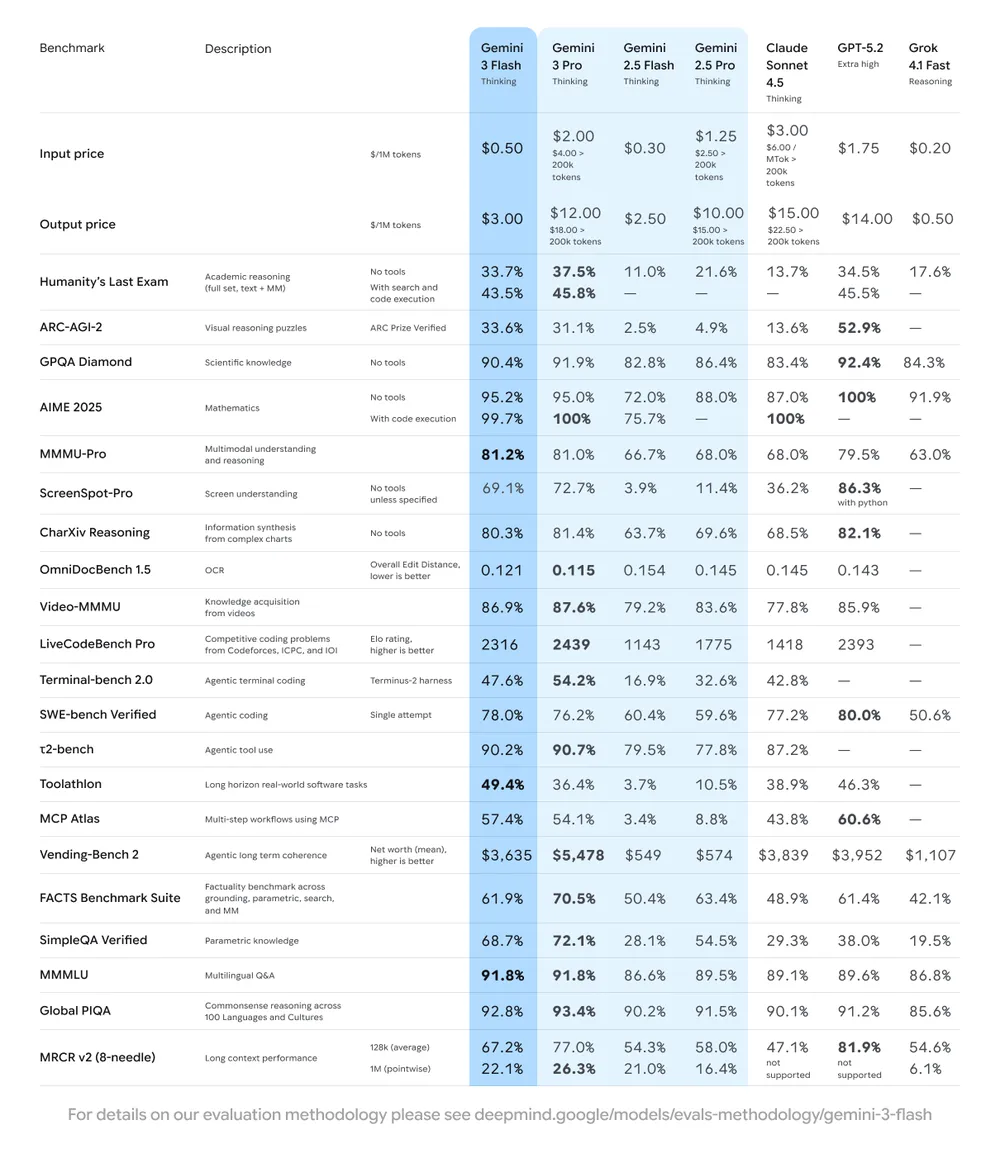
When we say Gemini 3 Flash is fast and smart, it’s not just empty talk. Its performance in key tests is eye-catching:
- Coding Powerhouse: In the SWE-bench Verified evaluation for agentic coding, Gemini 3 Flash scored a high 78%. This not only surpasses the previous 2.5 series but even beats its flagship big brother, Gemini 3 Pro. This means that in terms of automated code writing, it is not only responsive but also of extremely high quality.
- Top-Tier Logic: In the GPQA Diamond test, which measures graduate-level reasoning ability, it achieved an amazing 90.4%, proving its logical thinking capability has reached a top-tier level.
- Multimodal All-Rounder: In the MMMU Pro test for processing images and videos, it scored 81.2%, on par with Gemini 3 Pro.
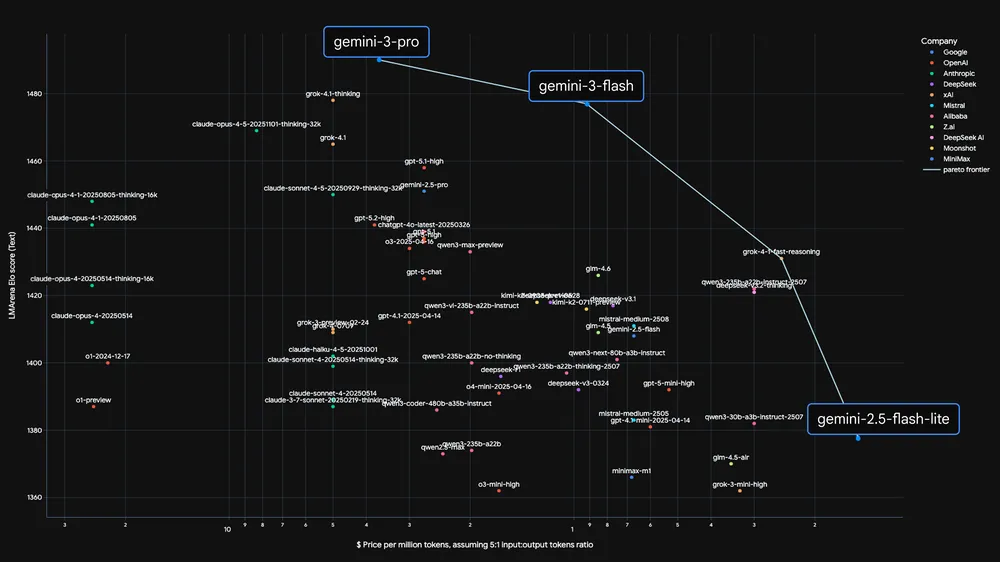
Gemini 3 Flash has found a near-perfect sweet spot across the three dimensions of “quality,” “cost,” and “speed,” which usually constrain each other.
Instant Combat Power for Developers: Intelligence That Keeps Up with Thought Speed
For developers, the emergence of Gemini 3 Flash is not just an upgrade, but a liberation of workflow. It is built for “iterative development,” meaning it can provide Pro-level coding capabilities with extremely low latency. Whether building Agentic systems or applications requiring real-time response, it handles them with ease.
Here are a few highlight applications of Gemini 3 Flash in actual development scenarios:
1. Google Antigravity and Production Updates
In the Google Antigravity demo, Gemini 3 Flash showed amazing speed, able to quickly update Production-ready applications. This solves the past anxiety developers faced when modifying live products, waiting due to model latency.
2. In-Game Real-Time AI Assistant
Imagine in a “Ball Launching Puzzle Game” requiring hand tracking, where AI needs to understand player gestures and give real-time feedback. Gemini 3 Flash uses its multimodal reasoning capability to achieve near-instant AI assistance, making the gaming experience incredibly smooth.
3. Rapid A/B Testing from Design to Code
Collaboration between designers and engineers is often time-consuming, but Gemini 3 Flash changes this. In demos, it can build and conduct A/B tests almost instantly, such as generating multiple different “Loading Spinner” designs. This greatly simplifies the Design-to-code process.
4. Static Images Transformed into Interactive Experiences
It can use multimodal reasoning to analyze a static image and add context-relevant UI overlays, instantly transforming a rigid picture into an interactive interface with almost no latency.
5. One Command, Multiple Variants
Developers only need to input a single command, and Gemini 3 Flash can generate three unique Design Variations in one go. This makes Rapid Prototyping easier than ever before.
Currently, well-known companies including JetBrains, Figma, Bridgewater Associates, and Cursor, Replit have started using the reasoning speed and efficiency of Gemini 3 Flash to revolutionize their businesses.
For more details, visit: https://blog.google/products/gemini/gemini-3-flash/
AI Assistant in the Terminal: A New Realm of Development Workflow
This update brings the powerful capabilities of the Gemini 3 series directly into your terminal. Developers can now rely on the intelligent auto-routing feature of the Gemini CLI, letting it decide when to use Gemini 3 Pro for particularly complex reasoning tasks, or you can manually select the model yourself to handle various daily jobs. More importantly, the significant improvement in reasoning capability of Gemini 3 Flash allows you to execute commands at a lower cost that previously might have required a Pro-level model.
Generating Apps with 3D Graphics: From Inspiration to Implementation
Gemini 3 Flash truly lets you “do anything” in the terminal! It enhances the underlying performance of coding sessions, whether in reasoning, tool use, or multimodal capabilities. Imagine generating a ready-made application with 3D graphics with just a few commands; doesn’t that sound cool?
Google showed an example where they used Gemini 3 Pro in the Gemini CLI to build a 3D voxel simulation of the Golden Gate Bridge, treating this command as a creative brief and technical specification. You might ask, can Gemini 3 Flash do that too? The answer is yes! In the past, generating such complex functional code usually required a high-level player like a Pro model. For instance, Gemini 2.5 Flash often got stuck or made logical errors when handling such complex tasks. But now, Gemini 3 Flash can handle these tasks precisely, proving that a rapid prototyping tool can also maintain code quality.
Intelligent Collaboration on Large Codebases: Handling PRs with Ease
Managing large codebases often feels like looking for a needle in a haystack. A Pull Request (PR) might hide hundreds of comments, and you have to filter them one by one to find the items that really need your attention. At this time, you need a model that can maintain a super-long context window and accurately capture key instructions amidst massive amounts of information.
In an actual demo, Gemini 3 Flash handled a simulated Pull Request thread containing 1,000 comments. Like a seasoned programmer, it quickly unraveled the “detailed discussions” to pinpoint a key request regarding timeout adjustments. Then, the Gemini CLI successfully applied the precise update to the configuration file on the first try. This fully proves the model’s ability to distinguish “signal” from “noise” within a massive context window and execute the correct modifications.
Automated Stress Testing: Simulating Real User Scenarios
Validating your backend infrastructure often requires simulating real user traffic. But hand-writing custom load testing scripts to handle concurrent requests and specific user journeys is not an easy task and is very time-consuming.
This kind of task is exactly Gemini 3 Flash’s forte! It can effectively reduce syntax hallucinations and failure loops while providing fast responses. In a demonstration, the Gemini CLI was used to stress test a web application deployed on Cloud Run. Gemini 3 Flash generated a Python script using asyncio to simulate three different user scenarios, such as “order success,” “payment failure,” and “inventory timeout.” When the initial execution returned a protocol error, the model immediately analyzed the trace log and patched the script. This allows you to launch a comprehensive load test in seconds and observe the results in the Cloud Run dashboard.
For more details, visit: https://developers.googleblog.com/gemini-3-flash-is-now-available-in-gemini-cli/
Price Showdown: Enjoy Top-Tier AI Compute at “Pocket Change” Prices
Besides whether the model is smart, what often tangles people up is the API bill at the end of the month. The emergence of Gemini 3 Flash seems to be designed to break this deadlock.
Let’s look directly at the data, comparing Gemini 3 Flash horizontally with other popular models on the market:
| Model Name | Input Price / 1M Tokens | Output Price / 1M Tokens | Cached Input / 1M Tokens |
|---|---|---|---|
| Google Gemini 3 Flash | $0.50 | $3.00 | $0.05 |
| Gemini 3 Pro (≤200k) | $2.00 | $12.00 | - |
| Gemini 2.5 Flash | $0.30 | $2.50 | $0.03 |
| GPT-5.2 | $1.75 | $14.00 | $0.175 |
| GPT-5.1 | $1.25 | $10.00 | $0.125 |
| Claude 4.5 Haiku | $1.00 | $5.00 | - |
| Grok 4 Fast (>128k) | $0.40 | $1.00 | $0.05 |
Highlight Analysis:
- Quarter of the Price, Flagship Enjoyment: Compared to its own flagship Gemini 3 Pro, the Flash version’s price is slashed to 1/4. This means under the same budget, you can run 4 times the test volume without sacrificing reasoning quality.
- Crushing Cost-Performance Ratio: Gemini 3 Flash’s input cost is a fraction of GPT-5.2’s and even significantly cheaper than GPT-5.1. Facing the famously cheap Claude 4.5 Haiku, the price is only half.
- Invisible Bonus of Caching: For developers who need to repeatedly send large amounts of background data, the cached price as low as $0.05 is simply a godsend.
Gemini AI Pro Plan Analysis: Three Modes and Daily Limits
To allow users to allocate computing power more precisely, the current Gemini AI Pro service divides model capabilities into three levels and sets clear “thinking” quota limits.
1. Three Modes: From Instant Reply to Deep Reasoning
- Shortcut Mode: Based on Gemini 3.0 Flash (No Thinking). Suitable for quick translations, simple Q&A, or summaries. Featured by “speed,” skipping deep reasoning.
- Thinking Mode: Based on Gemini 3.0 Flash (Thinking). Suitable for slightly more complex questions. Enables “Chain of Thought” capabilities, with slightly longer response times but greatly increased accuracy.
- Pro Mode: Based on Gemini 3.0 Pro. The strongest brain for handling high-difficulty tasks, complex debugging, or creative writing.
2. Daily Use Limits
- Pro Version Users: Daily limit 100 times. (Note: This is a combined count for “Thinking Flash” and “Pro 3.0”. If you use Thinking Mode 30 times, you only have 70 Pro Mode uses left).
- Ultra Version Users: Daily limit significantly increased to 500 times, suitable for heavy development or research.
- Free Version Users: Daily limit is floating (Daily limits may change frequently), dynamically adjusted by the system based on load.
General Users: Full Free Upgrade, More Convenient Life
This wave of updates is not just for developers; Gemini 3 Flash has now become the default model for the global Gemini App, replacing the old 2.5 Flash. This means all users can enjoy a more powerful AI experience for free.
- Golf Swing Analysis: Using powerful multimodal capabilities, you can upload a swing video, and Gemini 3 Flash can analyze and give an improvement plan within seconds.
- Real-time Drawing Guessing: Due to optimized speed, it can guess and understand what you are drawing in real-time while you are still doodling on the canvas.
- Voice Learning Assistant: Upload a recording, and it can find your knowledge blind spots and automatically generate quizzes and detailed explanations.
- Build Apps by Speaking: Even if you don’t know code, you can describe your ideas by voice, and Gemini can transform these unstructured thoughts into working application prototypes in minutes.
In addition, AI Overviews in Google Search is also gradually switching to Gemini 3 Flash, allowing you to get more structured and instant answers when searching for complex information (like planning travel or learning new concepts).
Keeping Up with the Times: API Considerations for Migrating from Gemini 2.5 to 3.0
If you are already a Gemini 2.5 user and are considering upgrading to the more powerful Gemini 3 series, there are some small details to note. The Gemini 3 family has significant improvements over 2.5 in many aspects, so when migrating, remember to consider the following points to make your transition smoother:
- Thinking Level: Previously, to get Gemini 2.5 to perform complex reasoning, you might have needed a lot of precise prompt engineering (like Chain of Thought). Now, you can try Gemini 3 directly and set
thinking_levelto"high"while simplifying your prompts. You might find the results are even better! - Temperature Settings: If your existing code has explicitly set the
temperatureparameter (especially to a low value for deterministic output), it is recommended to remove this parameter now and use the Gemini 3 default of 1.0. This avoids potential loop issues or performance degradation when handling complex tasks. - PDF and Document Understanding: The default PDF OCR resolution in Gemini 3 has been adjusted. If you previously relied on specific behaviors to parse dense documents, it is recommended to test the new
media_resolution_highsetting to ensure accuracy. Also, since the default resolution might be higher, leading to increased Token consumption, if your request exceeds the context window, it is recommended to explicitly lower the media resolution. - Image Segmentation: Gemini 3 Pro and Gemini 3 Flash currently do not support image segmentation (i.e., returning pixel-level masks of objects). If your workflow requires native image segmentation capabilities, it is recommended to continue using Gemini 2.5 Flash with
thinkingdisabled, or Gemini Robotics-ER 1.5. - Tool Support: Currently, Gemini 3 models do not support Maps grounding and Computer use tools, so these features will not transfer directly during migration. Additionally, the combination of built-in tools and function calling is not yet supported.
- OpenAI Compatibility: For users using the OpenAI compatibility layer, standard parameters will automatically map to corresponding Gemini parameters. For example,
reasoning_effort(OpenAI) maps tothinking_level(Gemini). It is worth noting thatreasoning_effort mediummaps tothinking_level high.
Conclusion
The advent of Gemini 3 Flash sets a new benchmark for AI performance. It no longer asks users to choose between “smart” and “fast.” Whether you are a developer needing to build prototypes extremely fast, or a daily user wanting an AI assistant that reacts instantly, Gemini 3 Flash provides a solution that is both powerful and economical. Now, open your Gemini App or terminal and experience this new speed for yourself!
Frequently Asked Questions (FAQ)
Q1: Is Gemini 3 Flash really completely free? Yes, for general Gemini App users, Gemini 3 Flash is the default free model. For developers, it offers very competitive paid APIs, and there is a free tier available for testing.
Q2: Can I use Gemini 3 Flash and Pro at the same time? Yes. If you are a Gemini Advanced subscriber or a paid API developer, you can freely switch between the two based on your needs. Pro version users have a combined daily quota of 100 uses for Thinking Mode or Pro model.
Q3: Why does my daily usage limit for the free version vary? The quota for the free version is dynamic; Google adjusts it in real-time based on global system load. During peak hours, the available usage count might be lower.
Q4: Is Gemini 3 Flash suitable for coding? Very suitable. It scored 78% in the SWE-bench Verified test, surpassing many older Pro models, making it especially suitable for development scenarios requiring fast iteration and debugging.

DMflow.chat
Discover DMflow.chat and unlock the new era of AI-powered customer service.
Learn More
videoweaver.app
Video Weaver: Professional video editing directly in your browser. No downloads required.
Learn More
DMflow.chat
DMflow.chat: Your intelligent AI partner for exceptional customer engagement.
Learn MoreDMflow.chat
Discover DMflow.chat and unlock the new era of AI-powered customer service.
Learn Morevideoweaver.app
Video Weaver: Professional video editing directly in your browser. No downloads required.
Learn MoreDMflow.chat
DMflow.chat: Your intelligent AI partner for exceptional customer engagement.
Learn More